# Jot documentation
> A local requirements board for you and your AI agents.
Source: https://github.com/RedHiwiK/jot
---
# Introduction
What Jot is, who it is for and how its pieces fit together.
URL: https://kunkunred.hiwik.cn/en/projects/jot/docs/
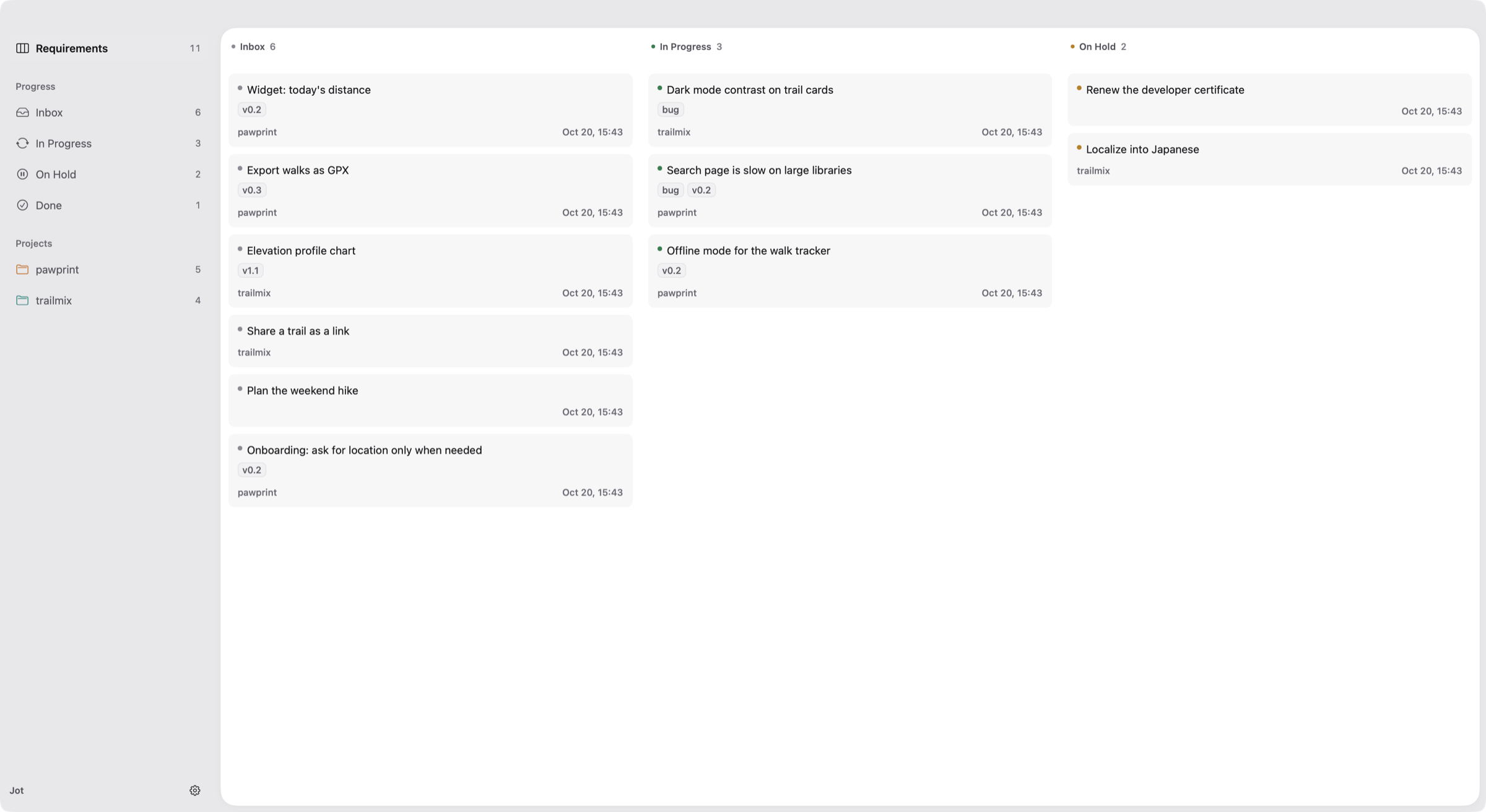
Jot is a local requirements board for one person and their AI agents. It keeps the requirements, ideas and to-dos that come up while you work — "the search page is slow", "add GPX export in v1.2", "renew the certificate" — and lets you move them from Inbox to Done.
### Why Jot
Most of these thoughts appear in the middle of other work: in a terminal, in a code review, in a conversation with a coding agent. Opening an issue tracker costs more than the thought is worth, so they get lost. Jot makes capturing cheaper than forgetting:
- **One line to capture.** `jot add "Search page is slow"` from any directory, or "note this down" to your agent.
- **Filed automatically.** Inside a Git repository, the requirement goes to that project without asking.
- **Progress on a board.** A native macOS app shows what is in the inbox, in progress and on hold.
- **Yours, on disk.** No account, server or sync service: one SQLite file and one Markdown file per requirement.
### The pieces
| Piece | What it does |
|---|---|
| `jot` CLI | The only thing that writes data. Every command has `--json` output for scripts and agents. |
| Jot.app | A SwiftUI board for macOS 14+. It calls the CLI bundled inside it, so it never disagrees with the CLI. |
| Agent skill | A `SKILL.md` that teaches Claude Code, Codex and other agents when and how to call the CLI. |
| `~/.jot` | The store: `jot.db` for metadata and history, `reqs/` for the Markdown bodies. |
### Concepts
- **Requirement** — one thing to do, with a title, an optional Markdown body, a state, an optional project and any number of tags.
- **State** — `inbox`, `in_progress`, `on_hold`, `done` or `archived`. It records intent, set by you or by an agent you asked. See [Workflow](https://kunkunred.hiwik.cn/en/projects/jot/docs/guides/workflow/).
- **Project** — an optional category, usually a Git repository, registered automatically on first capture. See [Projects and tags](https://kunkunred.hiwik.cn/en/projects/jot/docs/guides/projects-and-tags/).
- **Tag** — a free-form label such as `v1.2` or `bug`, independent of projects.
- **Link** — a pull or merge request bound to a requirement. See [Pull requests](https://kunkunred.hiwik.cn/en/projects/jot/docs/guides/pull-requests/).
### Next
- [Install Jot](https://kunkunred.hiwik.cn/en/projects/jot/docs/getting-started/installation/)
- [Five-minute quick start](https://kunkunred.hiwik.cn/en/projects/jot/docs/getting-started/quick-start/)
- [Use Jot with your AI agent](https://kunkunred.hiwik.cn/en/projects/jot/docs/guides/ai-agents/)
---
# Installation
Install the macOS app, the CLI and the agent skill.
URL: https://kunkunred.hiwik.cn/en/projects/jot/docs/getting-started/installation/
Jot has three parts you can install independently: the macOS app (which includes the CLI), the CLI on its own, and the agent skill.
### Let your agent install it
Paste this into Claude Code, Codex or any coding agent:
```text
Install the jot CLI and its skill by following https://github.com/RedHiwiK/jot/blob/main/docs/en/guides/ai-agents.md
```
### macOS app
Requires macOS 14 or later, Apple silicon or Intel.
```bash
curl -fsSLO https://github.com/RedHiwiK/jot/releases/latest/download/Jot_macos.zip
ditto -x -k Jot_macos.zip /Applications
xattr -dr com.apple.quarantine /Applications/Jot.app
```
The app is ad-hoc signed but not notarized, so Gatekeeper blocks the first launch. The `xattr` command removes the quarantine flag; alternatively, right-click Jot.app and choose **Open** once.
The app bundles a matching CLI. Expose it on your `PATH` to use the same binary in the terminal:
```bash
mkdir -p ~/.local/bin
ln -sf /Applications/Jot.app/Contents/Helpers/jot ~/.local/bin/jot
```
### CLI only
macOS or Linux, arm64 or amd64.
With Go 1.27 or later:
```bash
go install github.com/RedHiwiK/jot/cmd/jot@latest
```
Or from a release archive:
```bash
os=$(uname -s | tr A-Z a-z); arch=$(uname -m)
[ "$arch" = x86_64 ] && arch=amd64; [ "$arch" = aarch64 ] && arch=arm64
curl -fsSL "https://github.com/RedHiwiK/jot/releases/latest/download/jot_${os}_${arch}.tar.gz" | tar -xz -C /tmp
mkdir -p ~/.local/bin && mv "/tmp/jot_${os}_${arch}/jot" ~/.local/bin/jot
```
Each archive also contains `skills/jot/SKILL.md`.
### Check the binary
macOS ships an unrelated `/usr/bin/jot` that prints sequential numbers. Put `~/.local/bin` (or your Go bin directory) before `/usr/bin` in `PATH`, then check:
```bash
jot --version
## jot version 0.1.0
```
If you see numbers instead, see [Troubleshooting](https://kunkunred.hiwik.cn/en/projects/jot/docs/help/troubleshooting/#jot-prints-numbers).
### Initialize the store
```bash
jot init
```
This creates `~/.jot`. Set `JOT_HOME` to use another directory; see [Configuration](https://kunkunred.hiwik.cn/en/projects/jot/docs/reference/configuration/).
### Agent skill
```bash
## Claude Code
mkdir -p ~/.claude/skills/jot
curl -fsSL https://raw.githubusercontent.com/RedHiwiK/jot/main/skills/jot/SKILL.md -o ~/.claude/skills/jot/SKILL.md
## Codex
mkdir -p ~/.codex/skills/jot
curl -fsSL https://raw.githubusercontent.com/RedHiwiK/jot/main/skills/jot/SKILL.md -o ~/.codex/skills/jot/SKILL.md
```
More options, including agents without skill support: [AI agents](https://kunkunred.hiwik.cn/en/projects/jot/docs/guides/ai-agents/).
### Build from source
Requires Go 1.27+, and Swift 6 with macOS 14+ for the app.
```bash
git clone https://github.com/RedHiwiK/jot.git && cd jot
make install # CLI to ~/.local/bin/jot
make install-app # Jot.app to /Applications
```
### Uninstall
```bash
rm -rf /Applications/Jot.app ~/.local/bin/jot ~/.claude/skills/jot ~/.codex/skills/jot
rm -rf ~/.jot # deletes every requirement; back it up first if unsure
```
---
# Quick start
Capture, organize and finish your first requirements in five minutes.
URL: https://kunkunred.hiwik.cn/en/projects/jot/docs/getting-started/quick-start/
This walkthrough assumes the CLI is installed and `jot --version` prints `jot version ...`. To try it without touching your real store, run `export JOT_HOME=$(mktemp -d)` first.
### 1. Initialize
```bash
jot init
```
### 2. Capture inside a repository
```bash
cd ~/code/myapp
jot add "Search page is slow" --note "Traced to a DB query inside onChange"
## ✓ #1 captured into INBOX myapp
```
Because you are inside a Git repository, Jot registered it as the project `myapp` and filed the requirement there. Nothing was asked.
### 3. Capture something personal
```bash
jot add "Renew the developer certificate" --unfiled
```
`--unfiled` skips project inference. Outside a repository, requirements are project-less anyway.
### 4. Tag and list
```bash
jot tag 1 v1.2 bug
jot ls
```
```text
INBOX (2)
#2 Renew the developer certificate — just now
#1 Search page is slow myapp just now bug v1.2
```
### 5. Move it along
```bash
jot mv 1 in_progress
jot mv 1 done
jot ls --all
```
### 6. Read and edit the body
```bash
jot show 1 # metadata and the Markdown body
jot edit 1 # opens the body in your editor
```
Each requirement is a Markdown file under `~/.jot/reqs/`; see [Files and data](https://kunkunred.hiwik.cn/en/projects/jot/docs/reference/data-model/).
### 7. Open the app
Launch Jot.app. The board shows Inbox, In Progress and On Hold; drag cards between columns, double-click a title to rename it, and press ⌘F to search. See [The macOS app](https://kunkunred.hiwik.cn/en/projects/jot/docs/guides/macos-app/).
### 8. Hand it to your agent
Install the [skill](https://kunkunred.hiwik.cn/en/projects/jot/docs/guides/ai-agents/), then just talk: "note this down: the export button is hidden on small windows", "what's on my plate for myapp?", "mark 1 as done".
### Next
- [Capturing](https://kunkunred.hiwik.cn/en/projects/jot/docs/guides/capturing/) in depth
- [CLI reference](https://kunkunred.hiwik.cn/en/projects/jot/docs/reference/cli/)
---
# Capturing
Get requirements into Jot from the terminal, scripts and agents.
URL: https://kunkunred.hiwik.cn/en/projects/jot/docs/guides/capturing/
Capturing is meant to cost less than forgetting. `jot add` asks nothing: the project is inferred, the state is `inbox`, and everything else can be filled in later.
### One requirement
```bash
jot add "Search page is slow"
jot add "Search page is slow" --note "Traced to a DB query inside onChange"
```
The title becomes the list entry. `--note` goes into the **Notes** section of the Markdown body; use it for context, a conclusion from a discussion or acceptance criteria. Titles and notes are stored exactly as typed, in any language.
### Where it is filed
| Situation | Result |
|---|---|
| Inside a Git repository (or a worktree of one) | Filed under that repository's project, registered on first use |
| `--project myapp` | Filed under `myapp`, which must already be registered |
| `--unfiled` | No project, even inside a repository |
| Any other directory | No project |
The capture directory is remembered as `origin_cwd`, so [triage](https://kunkunred.hiwik.cn/en/projects/jot/docs/guides/projects-and-tags/#triage) can file it later.
### Tags at capture time
```bash
jot add "Ship the new board" --tag v1.2 --tag ui
jot add "Ship the new board" --tag v1.2,ui
```
### Many at once
```bash
jot add --stdin < ideas.txt
printf '%s\n' "Dark mode contrast" "Export as GPX" | jot add --stdin --tag v1.3
```
One requirement per non-empty line; piping into `jot add` without `--stdin` works too, and so does a multi-line title argument. With `--json`, several titles return an array. Capture stops at the first error, keeping the lines before it.
### From an agent
With the [skill](https://kunkunred.hiwik.cn/en/projects/jot/docs/guides/ai-agents/) installed, say "note this down: …" or "add a requirement for …". The agent captures with a short `--note` summarizing the conversation, reports the receipt in one line and returns to what it was doing. It does not start implementing the requirement.
### The body
Every requirement has a Markdown file with three sections:
```markdown
### Requirement
Search page is slow
### Acceptance criteria
- [ ]
### Notes
Traced to a DB query inside onChange
```
Edit it with `jot edit 42`, replace it with `jot body set 42 < body.md`, or use the editor in the app. See [Files and data](https://kunkunred.hiwik.cn/en/projects/jot/docs/reference/data-model/).
### Good habits
- Write the title as the outcome you want ("Search returns in under 200 ms"), not the activity.
- Capture first, organize later; the inbox is supposed to be messy.
- Put the evidence you have right now into `--note`; it is the part you will not remember.
---
# Projects and tags
Organize requirements with optional projects, free-form tags and triage.
URL: https://kunkunred.hiwik.cn/en/projects/jot/docs/guides/projects-and-tags/
Projects answer "where does this belong?"; tags answer "what is it about?" A requirement has at most one project and any number of tags.
### Projects
A project is a named category with a path, usually a Git repository. You rarely create one by hand: the first capture inside a repository registers it, named after the repository directory. If that name is taken, the parent directory is appended (`api-work`, `api-personal`).
```bash
jot project ls
jot project add notes ~/Documents/notes # any folder works, Git or not
jot project rename myapp my-app
jot project rm my-app
```
`project rm` only removes the category. Every requirement in it, including done and archived ones, becomes project-less with its state and body intact. No repository or file is deleted. Capturing inside that repository later registers it again; use `jot add --unfiled` to avoid that.
#### Moving requirements
```bash
jot set 42 --project myapp
jot set 42 --project "" # make it project-less
```
The Markdown file moves to the new project's directory under `~/.jot/reqs/`.
#### Display settings
```bash
jot project set myapp --color blue # red, orange, yellow, green, teal, blue, purple, gray; "" clears
jot project set myapp --repo-url https://github.com/o/myapp # "" falls back to the Git remote
```
The color only tints the project's folder icon in the app sidebar; cards always use status colors. The repository URL is inferred from the `origin` remote unless set.
The app's **Settings → Projects** page can also reorder, rename and remove projects and set the repository URL.
### Triage
Triage fills in missing projects for requirements captured outside a repository:
```bash
jot triage 42 43 44
jot triage 42 43 --project myapp
```
Without `--project`, an existing project is kept; otherwise Jot tries the directory where the requirement was captured, then the current directory. Triage never changes state. Results come back per requirement; failures are listed and make the command exit non-zero.
### Tags
Tags are free-form labels: release versions (`v1.2`), themes (`bug`, `perf`), anything.
```bash
jot tag 42 v1.2 # add, keeping existing tags
jot tag 42 43 44 v1.2 # several requirements at once
jot untag 42 v1.2
jot tag 42 --clear
jot set 42 --tags v1.2,bug # replace all tags
```
Rules:
- Tags are lower-cased and a leading `#` is dropped: `#V1.2` and `v1.2` are the same tag.
- Letters, digits and `. _ / -` are kept; spaces and commas separate tags.
- Leading all-digit arguments are requirement IDs, so pass an all-digit tag with `--tag`: `jot tag 42 --tag 2026`.
- There is no tag registry. A tag exists while at least one requirement carries it.
#### Managing tags
```bash
jot tag ls # every tag in use, with counts
jot tag rename v1.2 v1.2.1
jot tag rm v1.2 # removes the label everywhere; requirements stay
```
### Filtering
```bash
jot ls --project myapp
jot ls --tag v1.2 --tag bug # both tags (AND)
jot ls --tag-any v1.2,v1.3 # either tag (OR)
jot ls --untagged
jot ls --tag v1.2 --all # include done and archived
```
In the app, click a tag on a requirement to see the active requirements carrying it.
---
# Workflow
The five states, moving between them, archiving and deleting.
URL: https://kunkunred.hiwik.cn/en/projects/jot/docs/guides/workflow/
Jot has five states. Each one records what you intend, not whether some process is running.
| State | Meaning | Shown on the board |
|---|---|---|
| `inbox` | Captured, not started | Yes |
| `in_progress` | Being worked on, including review and acceptance | Yes |
| `on_hold` | Deferred, or waiting on something external | Yes |
| `done` | Finished | Sidebar only |
| `archived` | Not going to happen; still searchable and restorable | No |
### Changing state
```bash
jot mv 42 in_progress
jot mv 42 on_hold
jot mv 42 done
jot mv 42 inbox
```
In the app, drag a card to another column. Any state can move to any other; every transition is recorded with its time and actor in the state log.
### Archive and restore
```bash
jot rm 42 # archive
jot mv 42 inbox # restore
```
Archiving keeps the requirement and its Markdown file. Archived requirements stay out of the board and default listings; find them with `jot ls --all --state archived`, the app's search, or **Settings → Archived**, which can also restore them.
### Permanent deletion
```bash
jot purge 42 # asks for confirmation
jot purge 42 43 --yes
```
`purge` only accepts archived requirements. It removes the database rows, tags, links, state history and the Markdown file. It cannot be undone; prefer archiving.
In the app, right-click a card or row and choose **Delete…**. After you confirm, the app archives the requirement if needed and then purges it.
### A typical week
1. Capture freely during the day; everything lands in **Inbox**.
2. Once or twice a week, open the inbox: [triage](https://kunkunred.hiwik.cn/en/projects/jot/docs/guides/projects-and-tags/#triage) projects, tag the release, archive what no longer matters.
3. Move what you start to **In Progress**; park blocked items in **On Hold** with a note in the body saying what they wait for.
4. Mark items **Done** when they ship; `jot ls --tag v1.2 --all` shows the whole release.
### Priority
```bash
jot set 42 --priority 1 # high
jot set 42 --priority 0 # normal
```
High-priority requirements are listed first within each state by `jot ls` and in JSON results. Priority does not affect states, and the app does not display it.
---
# The macOS app
Browse and maintain requirements on a native board.
URL: https://kunkunred.hiwik.cn/en/projects/jot/docs/guides/macos-app/
Jot.app is a native SwiftUI board for macOS 14 and later. It is for browsing and maintaining requirements; capturing happens in the CLI or through an agent, so the app has no "new requirement" form.
The app reads and writes only through the CLI bundled at `Jot.app/Contents/Helpers/jot`. The app, the CLI and the skill therefore always see the same store and follow the same rules.
### Layout
- **Sidebar** — all active requirements, each state (Inbox, In Progress, On Hold, Done) with counts, and your projects. A project's folder icon uses its color.
- **Board** — one column per active state. Drag a card to another column to change its state.
- **Detail** — the Markdown body, title, tags and linked pull requests. Double-click the title to rename it; choose **Edit** to change the body, then **Save** or **Cancel**.
- **Inspector** — ID (click to copy), project, capture directory and dates. Toggle it with ⌥⌘I.
Click a tag on a requirement to see the active requirements carrying it.
### Search
⌘F opens a search over ID, title, project, state and capture note, across active and historical requirements. Use the arrow keys to select, Return to open and Esc to close.
### Keyboard shortcuts
| Shortcut | Action |
|---|---|
| ⌘1 … ⌘5 | Board, Inbox, In Progress, On Hold, Done |
| ⌥1 … ⌥9 | Projects in sidebar order (hold ⌥ to see the numbers) |
| ⌘F | Search |
| ⌘R | Refresh |
| ⌥⌘I | Toggle the inspector |
| ⌘[ | Back |
All shortcuts can be changed in **Settings → Shortcuts**.
### Settings
Open Settings with ⌘, or the gear at the bottom of the sidebar.
| Page | What you can do |
|---|---|
| General | Switch the language between English and Simplified Chinese |
| Appearance | Pick a theme: Newsprint, Paper, Solarized Light, One Dark, or your own |
| Projects | Reorder projects in the sidebar (this also sets ⌥1…⌥9), rename or remove them, set the repository URL |
| Shortcuts | Record a new binding for any action |
| Archived | Browse archived requirements and move them back to Inbox |
Project colors are set with `jot project set --color `; the app shows them but has no editor for them.
#### Custom themes
Choose **Export template** on the Appearance page to write a sample theme to `~/.jot/themes/`. Copy it, change the name and colors, then choose **Rescan**. Every `*.json` file in that folder appears as a theme; colors it leaves out fall back to Paper.
### Staying in sync
Changes made through the CLI or an agent appear within 15 seconds, or immediately with ⌘R. Edits made in the app are written through the CLI before the view updates; if a write fails, the error stays visible and your text is kept.
### Trying it with throwaway data
The app passes its environment to the CLI, so `JOT_HOME` works:
```bash
JOT_HOME=/tmp/jot-demo jot init
JOT_HOME=/tmp/jot-demo /Applications/Jot.app/Contents/MacOS/Jot
```
If the bundled CLI is missing (for example when running from `swift run`), the app looks for `~/.local/bin/jot`, `/usr/local/bin/jot` and `/opt/homebrew/bin/jot`.
---
# AI agents
Set up Claude Code, Codex and other agents to capture and organize requirements for you.
URL: https://kunkunred.hiwik.cn/en/projects/jot/docs/guides/ai-agents/
Jot is built to be driven by coding agents as much as by people. An agent needs two things: the `jot` CLI, whose `--json` output is a stable contract, and the skill file, which tells it when and how to call the CLI.
### Setup an agent can follow
1. **Install the CLI** (macOS or Linux):
```bash
os=$(uname -s | tr A-Z a-z); arch=$(uname -m)
[ "$arch" = x86_64 ] && arch=amd64; [ "$arch" = aarch64 ] && arch=arm64
curl -fsSL "https://github.com/RedHiwiK/jot/releases/latest/download/jot_${os}_${arch}.tar.gz" | tar -xz -C /tmp
mkdir -p ~/.local/bin && mv "/tmp/jot_${os}_${arch}/jot" ~/.local/bin/jot
```
With Go instead: `go install github.com/RedHiwiK/jot/cmd/jot@latest`.
2. **Check the binary.** macOS ships an unrelated `/usr/bin/jot`; `~/.local/bin` must come before `/usr/bin` in `PATH`.
```bash
jot --version # expect: jot version 0.1.0
```
3. **Initialize** once: `jot init`.
4. **Install the skill**:
```bash
# Claude Code
mkdir -p ~/.claude/skills/jot
curl -fsSL https://raw.githubusercontent.com/RedHiwiK/jot/main/skills/jot/SKILL.md -o ~/.claude/skills/jot/SKILL.md
# Codex
mkdir -p ~/.codex/skills/jot
curl -fsSL https://raw.githubusercontent.com/RedHiwiK/jot/main/skills/jot/SKILL.md -o ~/.codex/skills/jot/SKILL.md
```
From a clone, symlink instead so updates follow `git pull`: `ln -s "$PWD/skills/jot" ~/.claude/skills/jot`.
5. **Agents without skills** (Cursor and others): paste the contents of [`SKILL.md`](https://github.com/RedHiwiK/jot/blob/main/skills/jot/SKILL.md) into the project rules (`AGENTS.md`, `CLAUDE.md`, `.cursor/rules`).
The whole documentation is also available as a single file for agents: [`llms-full.txt`](https://kunkunred.hiwik.cn/en/projects/jot/llms-full.txt).
### What to say
| You say | The agent runs |
|---|---|
| "Note this down: search is slow" | `jot add "Search is slow" --note "..."` |
| "What's on my plate?" | `jot ls --json`, then a short summary |
| "What's left for myapp?" | `jot ls --project myapp --json` |
| "Clean up the inbox" | `jot ls --state inbox --json`, `jot triage ...`, `jot tag ...` |
| "Tag these for v1.2" | `jot tag 42 43 44 v1.2` |
| "Mark 42 as done" | `jot mv 42 done --json` |
| "What did we ship in v1.2?" | `jot ls --tag v1.2 --all --json` |
| (after opening a PR for 42) | `jot link 42 `, and `JOT-42` in the PR title |
### How the skill behaves
- It captures without interrogating you about project or priority, summarizes the receipt in one line and returns to the original task.
- It does not start implementing a requirement unless you ask.
- It summarizes JSON instead of pasting it.
- It reports batch failures (`failed` and the exit code) instead of calling a partial result a success.
- It never runs `jot purge` unless you explicitly ask to delete something permanently.
- It respects `JOT_HOME` and never edits another tool's configuration.
### Contract for scripts and agents
- Use `--json` for anything that is parsed; see [JSON output](https://kunkunred.hiwik.cn/en/projects/jot/docs/reference/json-output/).
- Exit code `0` means success. Batch commands return `{reqs, failed}` and exit non-zero on any failure.
- Errors go to stderr as `error: ...`.
- `JOT_HOME` selects the store, which keeps tests and experiments away from real data.
---
# Pull requests
Bind pull and merge requests to requirements.
URL: https://kunkunred.hiwik.cn/en/projects/jot/docs/guides/pull-requests/
When a requirement turns into code, bind the pull or merge request to it. The link shows up in JSON, in the Markdown frontmatter and on the requirement's page in the app.
```bash
jot link 42 https://github.com/owner/repo/pull/12
jot link 42 https://gitlab.example.com/group/repo/-/merge_requests/7
jot unlink 42 https://github.com/owner/repo/pull/12
jot unlink 42 --all
```
`link` is incremental: binding a second PR keeps the first. Links are listed in the order they were bound. Jot stores the URL only; it never contacts the host.
### Referring to requirements
In PR titles, descriptions and commit messages, write `JOT-42`. A bare `#42` is turned into a link to issue or PR 42 by GitHub and GitLab.
```text
fix(search): query the index instead of the table (JOT-42)
```
### With an agent
The skill tells agents to run `jot link ` right after opening a PR for a requirement, and to use the `JOT-` form in the PR text.
---
# CLI reference
Every jot command and flag.
URL: https://kunkunred.hiwik.cn/en/projects/jot/docs/reference/cli/
`jot` is the single source of truth for every write: the macOS app and the agent skill both call it. Every command that reads or writes data accepts `--json` for machine-readable output ([JSON output](https://kunkunred.hiwik.cn/en/projects/jot/docs/reference/json-output/)); without it, output is a short human-readable receipt.
Run `jot --help` for the full flag list of any command.
### Setup
```bash
jot init # create ~/.jot (or $JOT_HOME)
jot config set editor nano # editor for `jot edit`; falls back to $EDITOR, then vi
jot config ls --json
```
### Capture
```bash
jot add "Title"
jot add "Title" --note "Context, conclusion or acceptance criteria"
jot add "Title" --project myapp
jot add "Personal task" --unfiled
jot add "Title" --tag v0.2 --tag bug
jot add --stdin < titles.txt # one requirement per line
```
New requirements start in `inbox`. Without `--project`, the project is inferred from the current directory: inside a Git repository the repository is registered as a project automatically (named after its directory); elsewhere the requirement stays project-less. `--unfiled` skips inference.
A single `add --json` returns one requirement object; several titles (from `--stdin`, a pipe or a multi-line argument) return an array. `add` stops at the first error, keeping the titles captured before it.
### Query
```bash
jot ls # active requirements grouped by state
jot ls --all # include done and archived
jot ls --state on_hold
jot ls --project myapp
jot ls --tag v0.2 --tag bug # all of the tags (AND)
jot ls --tag-any v0.2,v0.3 # any of the tags (OR)
jot ls --untagged
jot show 42 --json # metadata plus the full body in `note`
jot body 42 # body without frontmatter
jot path 42 # absolute path of the Markdown file
```
`ls --json` returns `{reqs, projects, tags, detected_project, cwd}`: the full project and tag lists come with every listing, so a separate `project ls` or `tag ls` call is rarely needed. In `ls`, `note` is the capture note; in `show`, `note` is the whole body.
### Edit
```bash
jot set 42 --title "New title"
jot set 42 --priority 1 # 0 normal, 1 high
jot set 42 --project myapp
jot set 42 --project "" # make it project-less
jot set 42 --tags v0.2,bug # replace every tag
jot body set 42 < body.md # replace the body (Markdown without frontmatter)
jot edit 42 # open the body in the configured editor
jot triage 42 43 --json # fill in missing projects
jot triage 42 43 --project myapp --json
```
Changing the project moves the Markdown file to the new project's directory. `triage` keeps an existing project, otherwise tries the directory the requirement was captured in, then the current directory, and never changes state. An explicit `--project` overrides.
### Workflow
```bash
jot mv 42 in_progress
jot mv 42 on_hold
jot mv 42 done
jot mv 42 inbox
jot rm 42 # archive (recoverable)
jot mv 42 inbox # restore an archived requirement
jot purge 42 --yes # permanently delete an archived requirement
```
| State | Meaning |
|---|---|
| `inbox` | Captured, not started |
| `in_progress` | Being worked on, including review and acceptance |
| `on_hold` | Deferred or waiting on something external |
| `done` | Finished |
| `archived` | Not going to happen; still searchable and restorable |
State is set by hand (or by an agent the user asked to): it records intent, not whether any process is running. Every transition is recorded in `state_log`.
`purge` only accepts archived requirements and asks for confirmation unless `--yes` is given. It removes the database rows and the Markdown file.
### Tags
```bash
jot tag 42 v0.2 # add, keeping existing tags
jot tag 42 43 44 v0.2 # several requirements at once
jot tag 42 --tag 2026 # literal value (needed for all-digit tags)
jot untag 42 v0.2
jot tag 42 --clear
jot tag ls --json # every tag in use, with counts
jot tag rename v0.2 v0.3
jot tag rm v0.2 # drop the label everywhere; requirements stay
```
Tags are free-form labels orthogonal to projects: a requirement belongs to at most one project but can carry any number of tags. They are normalized to lower case with a leading `#` dropped, so `#V0.2` and `v0.2` are one tag. Letters, digits and `. _ / -` are kept; spaces and commas separate tags.
In `tag` and `untag`, leading all-digit arguments are read as requirement IDs, so pass an all-digit tag with `--tag`, which cannot be mixed with positional tags. There is no tag registry: a tag exists while some requirement carries it.
### Links
```bash
jot link 42 https://github.com/owner/repo/pull/12
jot unlink 42 https://github.com/owner/repo/pull/12
jot unlink 42 --all
```
Links bind pull/merge request URLs to a requirement. They appear as `links` in requirement JSON, in the frontmatter and on the app's detail page. Nothing is fetched from the host. Refer to requirements as `JOT-42` in PR titles, descriptions and commits; a bare `#42` collides with the host's own numbering.
### Projects
```bash
jot project add myapp ~/code/myapp
jot project ls --json
jot project rename myapp my-app
jot project set myapp --color blue # red/orange/yellow/green/teal/blue/purple/gray; "" clears
jot project set myapp --repo-url https://github.com/o/r # "" falls back to the Git remote
jot project rm myapp --json
```
Projects are optional categories and do not have to be Git repositories. `repo_url` in `project ls --json` is either configured or inferred from the `origin` remote (`repo_url_inferred: true`). The color only tints the project's folder icon in the app sidebar.
`project rm` only removes the category: every requirement in it, including done and archived ones, becomes project-less with its state and body intact. No repository or requirement file is deleted. Capturing again inside that repository registers the project again; use `add --unfiled` to avoid that.
### Batch results and errors
Batch commands (`triage`, `tag`, `untag`) process every item and return `{reqs, failed}` in JSON. Any failure makes the command exit non-zero, so check both the exit code and `failed`.
Errors go to stderr as `error: ...` with exit code 1. `not initialized yet; run: jot init` means the store does not exist.
### Maintenance
```bash
jot sync # rewrite every frontmatter block from SQLite
```
SQLite and the Markdown files cannot share a transaction. If a command reports that metadata was updated but the body sync failed, run `jot sync`.
---
# JSON output
The machine-readable shapes returned by --json.
URL: https://kunkunred.hiwik.cn/en/projects/jot/docs/reference/json-output/
Every data command accepts `--json`. The shapes below are a contract with the macOS app and with agents: fields are added over time, but not renamed or removed. Fields that are empty are omitted, so treat every optional field as possibly missing.
### Requirement
Returned by `add`, `show`, `set`, `mv`, `tag`/`untag` (inside `reqs`) and `ls` (inside `reqs`).
```json
{
"id": 1,
"title": "Search page is slow",
"priority": 0,
"state": "inbox",
"project": "myapp",
"tags": ["v1.2"],
"links": ["https://github.com/owner/myapp/pull/12"],
"path": "myapp/0001-2026-10-20-Search-page-is-slow.md",
"note": "Traced to a DB query inside onChange",
"origin_cwd": "/home/me/code/myapp",
"created_at": "2026-10-20T16:55:34+08:00",
"updated_at": "2026-10-20T16:55:34+08:00"
}
```
| Field | Type | Notes |
|---|---|---|
| `id` | integer | Stable, never reused |
| `title` | string | |
| `priority` | integer | `0` normal, `1` high |
| `state` | string | `inbox`, `in_progress`, `on_hold`, `done`, `archived` |
| `project` | string | Omitted when project-less |
| `tags` | string[] | Normalized, sorted; omitted when empty |
| `links` | string[] | In binding order; omitted when empty |
| `path` | string | Body file relative to `~/.jot/reqs/`; `jot path ` prints the absolute path |
| `note` | string | In `ls`: the capture note. In `show`: the whole body without frontmatter |
| `origin_cwd` | string | Directory the requirement was captured in |
| `created_at`, `updated_at` | string | RFC 3339 with offset |
### `ls`
```json
{
"reqs": [ /* requirement objects */ ],
"projects": [ /* project objects */ ],
"tags": [ { "tag": "v1.2", "count": 1 } ],
"detected_project": "myapp",
"cwd": "/home/me/code/myapp"
}
```
`projects` and `tags` always describe the whole store, not just the filtered results, so one call is enough to know what exists. `detected_project` is the project the current directory maps to, when there is one.
### Project
Returned by `project ls` (an array) and inside `ls`.
```json
{
"name": "myapp",
"repo_path": "/home/me/code/myapp",
"open_count": 1,
"color": "blue",
"repo_url": "https://github.com/owner/myapp",
"repo_url_inferred": true
}
```
`open_count` counts requirements that are not done or archived. `repo_url_inferred` is `true` when the URL comes from the `origin` remote rather than `project set --repo-url`.
### `tag ls`
```json
{ "tags": [ { "tag": "bug", "count": 2 }, { "tag": "v1.2", "count": 4 } ] }
```
### Batch results
`triage`, `tag` and `untag` process every item and return:
```json
{
"reqs": [ /* requirements that succeeded */ ],
"failed": [ "#99: requirement not found" ]
}
```
If `failed` is not empty, the command also prints `error: N requirement(s) failed` to stderr and exits with status 1. Always check both.
`add` is different: it returns one requirement object for a single title and an array for several (from `--stdin`, a pipe or a multi-line argument). It stops at the first error; titles before it are already captured.
### Errors
Errors are written to stderr as `error: ` with exit status 1; stdout stays empty or holds the partial batch result. Common messages:
| Message | Meaning |
|---|---|
| `not initialized yet; run: jot init` | The store does not exist |
| `requirement not found` | No requirement with that ID |
| `project "x" is not registered` | Register it with `jot project add` first |
| `unknown state "x"` | Use one of the five states |
---
# Files and data
What Jot stores where, the Markdown format and the SQLite tables.
URL: https://kunkunred.hiwik.cn/en/projects/jot/docs/reference/data-model/
Everything lives in one directory, `~/.jot` by default or `$JOT_HOME` when set:
```
~/.jot/
├── jot.db SQLite (WAL): metadata, state history, tags, links, settings
├── themes/ optional custom app themes (*.json)
└── reqs/
├── _inbox/ project-less requirements
│ └── 0007-2026-10-20-Plan-the-weekend.md
└── myapp/
└── 0042-2026-10-18-Search-page-is-slow.md
```
Back up the whole directory. Nothing outside it is read or written, apart from `.git/config` of registered projects to infer their web URL.
### Markdown bodies
Markdown is authoritative for the body. The frontmatter is a readable copy of the SQLite metadata, rewritten by the CLI on every change:
```markdown
---
id: 42
title: "Search page is slow"
state: in_progress
project: "myapp"
tags: [v0.2, perf]
created: 2026-10-18T09:12:44+08:00
---
### Requirement
Search page is slow
### Acceptance criteria
- [ ]
### Notes
Traced to a direct DB query inside onChange
```
The three headings are a fixed file format, like the frontmatter keys. Content under them is stored as typed, in any language. Edit the body with `jot edit`, `jot body set` or the app; editing the file directly also works, but change metadata only through the CLI, because `jot sync` rewrites the frontmatter from SQLite.
### SQLite tables
| Table | Contents |
|---|---|
| `reqs` | ID, title, body path, state, optional project, priority, capture directory and note, created/updated/started/done timestamps |
| `projects` | Name, path, optional color and repository URL |
| `state_log` | Every state transition: from, to, actor, time |
| `req_tags` | `(req_id, tag)` pairs; the tag list is a `SELECT DISTINCT`, so unused tags disappear on their own |
| `req_links` | `(req_id, url)` pairs in binding order |
| `meta` | Settings such as the editor |
The schema is in [`internal/store/schema.sql`](https://github.com/RedHiwiK/jot/blob/main/internal/store/schema.sql). The app never opens the database directly: it calls the bundled CLI and decodes its JSON, so state rules, project inference and frontmatter sync exist in one place.
### Consistency
Body writes are atomic (write to a temporary file, then rename). SQLite and files cannot share a transaction: when a file operation fails after the metadata changed, the command reports it and `jot sync` repairs the frontmatter. Project removal rolls back when moving bodies fails.
---
# Configuration
Environment variables, the editor setting and app preferences.
URL: https://kunkunred.hiwik.cn/en/projects/jot/docs/reference/configuration/
Jot has very little to configure on purpose.
### Environment variables
| Variable | Effect |
|---|---|
| `JOT_HOME` | Store directory instead of `~/.jot`. Useful for tests, demos and separate stores. The app passes it through to its CLI. |
| `EDITOR` | Editor for `jot edit` when no editor is configured |
| `NO_COLOR` | Disable colored CLI output |
### Editor
```bash
jot config set editor nano # an executable name or path
jot config get editor
jot config ls --json
jot config set editor "" # back to $EDITOR, then vi
```
The setting is stored in the database, so it follows the store selected by `JOT_HOME`.
### App preferences
Language, theme, shortcuts, sidebar order and window sizes are macOS preferences of the app (`io.github.redhiwik.jot`), changed in the app's Settings. Custom themes live in `~/.jot/themes/*.json`; see [The macOS app](https://kunkunred.hiwik.cn/en/projects/jot/docs/guides/macos-app/#custom-themes).
### Shell completion
```bash
jot completion zsh > "${fpath[1]}/_jot" # zsh
jot completion bash > /usr/local/etc/bash_completion.d/jot
jot completion fish > ~/.config/fish/completions/jot.fish
```
---
# Troubleshooting
Fixes for common installation and usage problems.
URL: https://kunkunred.hiwik.cn/en/projects/jot/docs/help/troubleshooting/
### `jot` prints numbers
macOS ships `/usr/bin/jot`, an unrelated tool that prints sequential numbers, and it is found before yours. Check which one runs:
```bash
which -a jot
```
Put your install directory first in `PATH`, for example in `~/.zshrc`:
```bash
export PATH="$HOME/.local/bin:$PATH"
```
Then open a new terminal and run `jot --version`; it should print `jot version ...`.
### "Jot.app can't be opened"
The app is ad-hoc signed and not notarized, so Gatekeeper blocks downloads of it. Remove the quarantine flag once:
```bash
xattr -dr com.apple.quarantine /Applications/Jot.app
```
Or right-click Jot.app in Finder, choose **Open**, then confirm.
### `not initialized yet; run: jot init`
The store does not exist yet. Run `jot init`. If you use `JOT_HOME`, make sure it is set in the same shell (and for agents, in their environment).
### The app says "jot not found"
The app could not find its bundled CLI or any CLI on the fallback paths. Reinstall the app from the release zip, or install the CLI to `~/.local/bin/jot`.
### The app does not show a change made in the terminal
The app refreshes every 15 seconds. Press ⌘R to refresh now. If the change still does not appear, check that the terminal and the app use the same store: a `JOT_HOME` set in your shell does not reach an app launched from the Dock.
### "metadata updated, but body sync failed"
SQLite and the Markdown files cannot change in one transaction. The metadata change was saved; run `jot sync` to rewrite the frontmatter of every body from the database.
### A requirement went to the wrong project
```bash
jot set 42 --project correct-name
jot set 42 --project "" # or make it project-less
```
To stop a repository from being registered, capture with `--unfiled`, or remove the project with `jot project rm` (requirements are kept).
### Moving to a new Mac
Copy `~/.jot` to the same place on the new Mac, then install the app and CLI. Everything — requirements, history, projects, tags, links and custom themes — lives in that directory.
### Still stuck
Open an issue at [github.com/RedHiwiK/jot/issues](https://github.com/RedHiwiK/jot/issues) with `jot --version`, what you ran and what happened.